|
Deluxe herbs |
|
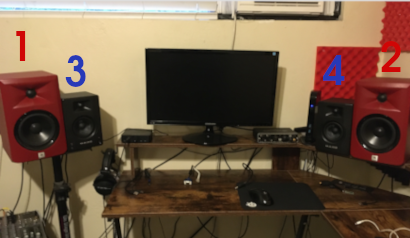
Deluxe herbs are digital music files in .herb format, mixed into 2, 4, or 6 channels (usually 4 channels). It's intended for a front facing speaker setup (like the picture below). This allows artists and producers to mix and release music with much more dynamics, texture, soundstage and loudnes. |
|
All debit/credit card processing, and payments are currently done securely through Ko-Fi! You never share your info with my website. |
|
Step 1: Get 4 speakers (preferably the same model, but not required). Try to set them up symetrically like the image below. |
 |
Step 2: Have a PC desktop with a soundcard that supports 5.1 or 7.1, or a USB interface or soundcard that supports at least 4 output channels. |
Step 3: If you are using an internal desktop soundcard, open your audio drivers and set output to 4.0 or quadraphonic (if it allows you). Otherwise ignore this step. |
Step 4: Download and run herb sauce for your operating system, using the download link at the top of this page (.exe for Windows, Mac standalone executable, or Linux standalone binary). |
2026 Deluxe Herbs LLC, dba. Deluxe herbs
The .herb file type and the herb sauce software are free and open source.
All rights reserved.